
Prefer to Listen? Play this quick summary instead!
Australia recorded 146,700 serious workers’ compensation claims in 2023–24, with each claim involving at least one week of working time lost, according to Safe Work Australia’s latest WHS statistics. This highlights the importance of prevention in every workplace, including office, remote, and hybrid environments.
For desk-based teams, discomfort often starts with small daily habits. A monitor may sit too low. A laptop may be used for hours without external equipment. A chair may lack lower back support. These issues can affect comfort, focus, and productivity over time.
One effective way to tackle this issue is through ergonomics training. At AusRehab, we support organisations with practical workplace ergonomics training that helps employees improve workstation awareness, posture, movement habits, and injury prevention.
Why Ergonomics Matters in Today's Workplace
Modern work has changed. Many employees now move between office desks, home workstations, shared spaces, and laptop-based setups. This makes office ergonomics important for office workers, remote workers, and hybrid teams.
A well-set-up workstation supports the body during desk-based tasks. It can help reduce awkward posture, repeated reaching, poor wrist positioning, and prolonged sitting.
SafeWork NSW identifies musculoskeletal disorders as the most common work-related injuries and diseases in NSW. From 2018 to 2023, NSW recorded around 44,000 serious workers compensation claims each year, with more than half related to musculoskeletal disorders, according to SafeWork NSW’s musculoskeletal disorder data.
The Australian Institute of Health and Welfare also reports that around 7.3 million Australians, or 29% of the population, were living with chronic musculoskeletal conditions in 2022, based on AIHW musculoskeletal conditions data.
These figures show why early prevention matters. Workplace ergonomics helps employees understand how daily work habits can affect comfort, well-being, and performance.
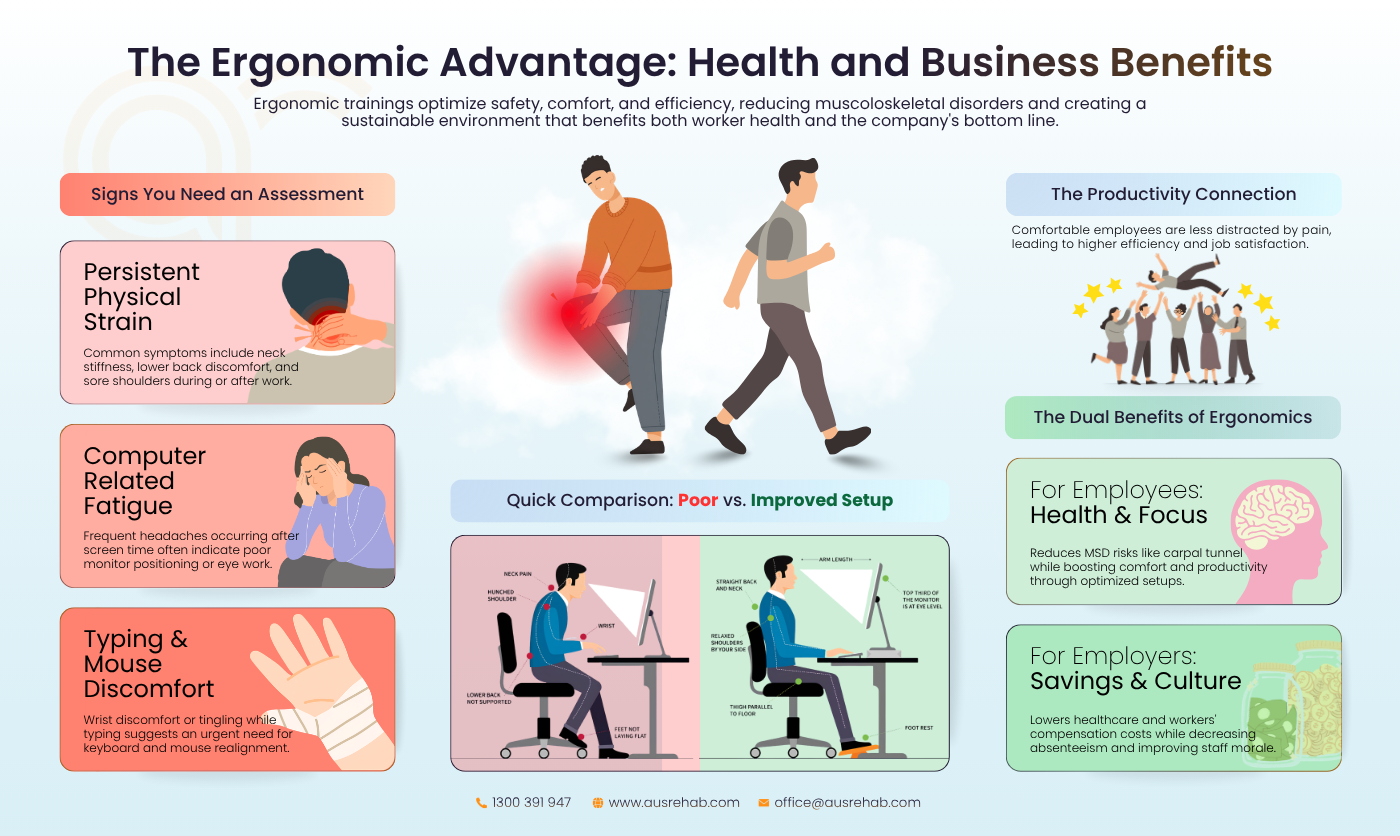
⚠️ Signs Your Workstation May Be Causing Discomfort
- Neck stiffness during desk work
- Headaches after screen time
- Sore shoulders
- Wrist discomfort
- Lower back pain
- Fatigue after prolonged sitting
- Tingling or numbness in the hands
- Frequent shifting in the chair
- Raised shoulders while typing
- Eye strain from monitor placement
What Is Ergonomics Training?
Ergonomics training is workplace education that helps employees understand how to set up and use their workstations in a safer and more comfortable way.
It focuses on workstation awareness, posture coaching, injury prevention, and healthy workplace habits. It is not only about adjusting equipment but also about helping employees understand how posture, movement, and workstation layout affect the body during the workday.
What Does Ergonomics Training Typically Cover?
An ergonomics training session gives employees practical education they can apply straight away. AusRehab’s ergonomics training covers workstation setup, posture, movement, task demands, and environmental factors.
Common topics include:
- Workstation setup training for office and remote environments
- Chair and desk positioning
- Monitor ergonomics and screen height
- Keyboard and mouse setup
- Office posture and seated alignment
- Movement and stretching habits
- Injury prevention strategies
- Task demands during computer-based work
- Common warning signs of poor workstation setup
- Practical changes for laptop use
- Environmental factors such as lighting, space, and reach zones
The goal is to help employees understand what to adjust, why it matters, and how to build better habits during the workday.
Common Ergonomic Risks in Modern Workplaces
Ergonomic risk can appear in any desk-based role. It often comes from repeated habits rather than one major event. Workplace habits that may increase ergonomic risk:
- Prolonged sitting without movement breaks
- Repetitive keyboard or mouse use
- Poor monitor positioning
- Unsupported wrists during typing
- Laptop-only setups
- Poor seating choices
- Limited movement throughout the day
- Reaching for the mouse
- Twisting to view a second screen
- Sitting on the front edge of the chair
- Leaning toward the monitor
- Using a desk that is too high or too low
- Working from couches or beds
- Raising shoulders while typing
- Keeping frequently used items outside easy reach
These habits can add strain to the neck, shoulders, wrists, back, and hips. Office ergonomics training helps employees identify these risks early and make simple improvements.
Benefits of Ergonomics Training
The benefits of ergonomics training are shared across employees and employers.
For employees, the value is immediate and practical. They learn how to adjust their own workstation and respond to early warning signs. For employers, the value sits in prevention, consistency, and workplace wellbeing.
Safe Work Australia reports that Australia’s economy would be larger by an average of $28.6 billion each year without work-related injuries and illnesses, according to Safe Work Australia’s 2024 WHS statistics.
Benefits for Employees
Employees benefit when they understand how to set up and use their workstation. Ergonomics training can help employees:
- Improve daily comfort
- Reduce physical strain
- Build healthier work habits
- Improve posture awareness
- Identify early warning signs
- Make simple workstation adjustments
- Reduce awkward reaching and twisting
A training session also gives employees the language to describe their concerns. Instead of saying, “My desk feels wrong,” they can explain that their monitor is too low, their wrists are not neutral, or their chair does not support their lower back. That clarity helps employees seek the right support earlier.
Benefits for Employers
Employers benefit when employees receive practical prevention education. Workplace ergonomics training can help organisations:
- Support injury prevention
- Improve productivity
- Reduce discomfort-related absenteeism
- Support workplace wellbeing
- Build a proactive safety culture
- Improve workstation consistency
- Support remote and hybrid work practices
For HR managers and organisations, ergonomics training is a practical way to support people before issues escalate. It also gives teams a shared standard for workstation use.
💡 Did you know?
Poor workstation habits and prolonged sitting are common contributors to workplace discomfort. Ergonomics training can help employees identify and correct these issues before they affect wellbeing and productivity.
Ergonomic Workstation Setup Checklist
Use this checklist to review your workstation setup and identify simple changes that may improve comfort and posture.
This checklist is general guidance. It does not replace individual clinical advice or a full ergonomic assessment. Employees with ongoing pain, injury, or medical concerns should seek appropriate professional support.
Office Chair Setup Checklist
| What to Check | Correct Position | Quick Fix |
|---|---|---|
| Chair Height | Feet flat on the floor | Adjust chair height |
| Lumbar Support | Lower back supported | Add a support cushion |
| Seat Depth | Small gap behind the knees | Move the chair position |
| Armrests | Shoulders relaxed | Lower or remove armrests if they cause shoulder lifting |
| Backrest | Upright with slight recline | Adjust the backrest angle |
| Foot Position | Feet supported | Use a footrest if needed |
Good office chair ergonomics start with the feet, hips, and lower back. The goal is not a rigid posture. The goal is to support posture with regular movement.
Monitor and Desk Setup Checklist
| What to Check | Correct Position | Quick Fix |
|---|---|---|
| Monitor Height | Top third at eye level | Raise monitor |
| Monitor Distance | About arm’s length | Adjust distance |
| Desk Height | Elbows near 90 to 100 degrees | Adjust the desk or chair |
| Screen Position | Directly in front | Centre the main screen |
| Lighting | No glare on screen | Adjust the screen or light source |
| Documents | Close to the monitor | Use a document holder |
Good monitor ergonomics help reduce awkward neck posture. If you use two monitors equally, place them side by side with the join centred in front of you. If one monitor is used more often, place that screen directly in front of you.
Keyboard and Mouse Checklist
| What to Check | Correct Position | Quick Fix |
|---|---|---|
| Wrist Position | Neutral | Adjust keyboard position |
| Mouse Placement | Close to the body | Reduce reaching |
| Shoulders | Relaxed | Reposition equipment |
| Keyboard Height | Elbows comfortable | Adjust the chair or desk |
| Mouse Grip | Light and relaxed | Avoid gripping tightly |
| Reach Zone | Items close to the body | Move frequent items closer |
Good keyboard ergonomics and mouse placement can reduce strain on the hands, wrists, elbows, and shoulders. These small setup choices can make a noticeable difference during a long workday.
Common Ergonomic Mistakes Office Workers Make
Even experienced office workers can develop poor habits. The most common ergonomic mistakes are often simple. They are also easy to miss because they become routine.
Common mistakes include:
- Slouching during desk work
- Placing the monitor too low
- Using unsupported wrists
- Sitting for long periods without movement
- Working from a couch
- Poor laptop positioning
- Raising shoulders while typing
- Sitting too far from the desk
- Keeping the mouse too far away
- Using a chair with poor lower back support
- Looking down at a laptop screen for hours
- Sitting with feet unsupported
- Twisting toward a second screen
- Ignoring early discomfort
These issues can affect office posture and increase physical strain. Employees should aim to change their posture throughout the day. This may include standing briefly, walking during phone calls, stretching, or resetting the workstation after lunch.
⚡ Struggling with low energy?
Explore our Top Tips to Tackle Fatigue and Boost Productivity at Work and discover simple strategies to stay focused, energised, and productive throughout the day.
Work From Home Ergonomics Tips
Remote work can be productive, but home setups are not always designed for regular desk work. Dining chairs, couches, beds, and kitchen tables can create poor posture and repeated strain.
WorkSafe Queensland advises workers to keep the keyboard and mouse directly in front of the body and close to the edge of the desk. It also notes that posture should vary throughout the day because the body is not designed to stay in one position for long periods, based on WorkSafe Queensland’s workstation setup guidance.
Simple Improvements for Remote Workers
To improve work-from-home ergonomics, remote workers can:
- Raise the laptop screen
- Use an external keyboard and mouse
- Avoid couches and beds for regular work
- Keep the mouse close to the keyboard
- Support the lower back
- Keep feet flat on the floor or on a stable support
- Take regular movement breaks
- Reduce screen glare
A good ergonomic desk setup does not need to be expensive. It needs to support the main work tasks.
🏠 Working From Home?
Small changes, such as raising your laptop screen and using an external keyboard and mouse, can improve comfort without expensive equipment.
When Should Workplaces Consider Ergonomics Training?
Businesses should provide workplace ergonomics training to employees engaged in routine desk or computer work. Organisations should consider training during:
- Onboarding for new employees
- Recurring discomfort complaints
- Hybrid work transitions
- Office relocations
- Workstation changes
- Injury prevention programs
- New equipment rollouts
- Growth in desk-based teams
- Increased remote work
- Return-to-office planning
- WHS program reviews
- Team wellbeing initiatives
Training can also be useful after an ergonomic assessment program. Assessment results may show common issues across the workplace. Group training can then address those patterns at scale.
AusRehab’s ergonomics group training is designed for teams and is available across NSW, VIC, QLD, WA, and ACT. The service can support organisations with office-based, remote, and hybrid workers who perform regular screen-based or desk-based tasks.
Creating Healthier Workplaces Through Ergonomics Training
Workplace ergonomics is about more than adjusting chairs and monitors. It helps employees understand how workstation setup, posture, and daily habits affect comfort, productivity, and well-being.
Ergonomics training provides practical guidance for healthier workplace behaviours, injury prevention, and more comfortable working environments.
AusRehab supports organisations through workplace ergonomics training, injury prevention programs, workplace rehabilitation services, and return-to-work support. Our team works with employers, insurers, injured workers, and treating professionals to support safe and sustainable return-to-work outcomes across NSW, ACT, and WA.
Frequently Asked Questions (FAQs)
What is ergonomics training and why is it important?
Ergonomics training is workplace education that helps employees understand how to set up and use their workstations safely and comfortably. It is important because poor workstation habits can contribute to discomfort, reduced focus, and increased ergonomic risk. Training helps employees improve posture awareness, adjust equipment, and recognise early warning signs.
Who should participate in workplace ergonomics training?
Workplace ergonomics training is useful for employees who perform regular desk-based or screen-based work. This includes office workers, remote workers, hybrid teams, administration staff, call centre teams, managers, HR teams, and employees who use laptops for long periods.
What happens during an ergonomics training session?
An ergonomics training session usually covers workstation setup, posture education, movement habits, and injury prevention strategies. Employees may learn how to adjust their chair, desk, monitor, keyboard, and mouse. They may also receive guidance on stretching, movement breaks, and safer work routines.
Can ergonomics training help reduce workplace injuries?
Ergonomics training can help reduce ergonomic risk by improving awareness and daily work habits. It may help employees identify and correct poor workstation setup before discomfort becomes more serious. It should be used as part of a broader workplace health and safety approach.
How often should workplaces provide ergonomics training?
Many workplaces provide office ergonomics training during onboarding, office relocations, workstation changes, or hybrid work transitions. Regular refresher training may also be useful when teams change equipment, report discomfort, or adopt new work arrangements.
Is ergonomics training beneficial for remote and hybrid workers?
Yes. Work-from-home ergonomics is important because remote workers may use dining tables, couches, laptops, or non-adjustable chairs. Training helps remote and hybrid workers apply safe workstation principles across different locations.
Can ergonomics training improve employee productivity?
Ergonomics training may support productivity by helping employees reduce discomfort and physical distractions during desk work. Comfortable employees are often better able to focus on their tasks. Training also helps teams work with clearer workstation standards.
What industries benefit most from ergonomics training?
Any industry with desk-based, computer-based, or repetitive workstation tasks can benefit from workplace ergonomics education. This may include corporate offices, government teams, healthcare administration, education, finance, legal services, technology, insurance, and customer service teams.
How can employers identify when ergonomics training is needed?
Employers may consider workplace ergonomics training when employees report neck stiffness, sore shoulders, headaches, wrist discomfort, or lower back pain. Training may also be useful during onboarding, office moves, hybrid work changes, or new equipment rollouts.
Does AusRehab provide workplace ergonomics training for teams and organisations?
Yes. AusRehab provides ergonomics training for teams and organisations across NSW, VIC, QLD, WA, and ACT. Our ergonomics group training covers workstation setup, posture, movement, task demands, and environmental factors. It can also support remote and hybrid workers who complete regular desk-based or screen-based work.