
Prefer to Listen? Play this quick summary instead!
Ergonomics training helps office workers understand how to set up their workstation, improve posture, reduce physical strain and build safer daily work habits. For workplaces across Sydney and NSW, AusRehab provides practical Ergonomics Training that supports office, hybrid and remote teams with realistic strategies for safer desk-based work.
For many office and remote workers in NSW, discomfort does not begin with one obvious injury. It often starts with small habits repeated every day. A low monitor. A chair that does not support the lower back. A mouse that sits too far away. A laptop used on a dining table. Long hours of sitting with very little movement.
Over time, these habits may contribute to neck stiffness, sore shoulders, wrist discomfort, lower back pain, headaches, eye strain and fatigue during desk work.
This is why office ergonomics matters for employers, workers, insurers, and doctors. A healthier workstation is not just about buying better equipment. It is about helping people understand how their body interacts with their desk, screen, keyboard, mouse, chair, work tasks and movement patterns.
This hybrid guide explains why workplace ergonomics training matters, how office workers can improve their workstation setup, what common ergonomic risks look like and when AusRehab may be able to support a workplace with practical training.
Quick Answer: Why Do Office Workers Need Ergonomics Training?
Office workers need ergonomics training because prolonged sitting, repetitive computer use and poor workstation habits can contribute to discomfort, reduced concentration and avoidable physical strain.
Training helps employees learn how to adjust their desk, chair, monitor, keyboard and mouse so the workstation supports the body instead of forcing the body to adapt to a poor setup.
For employers, workplace ergonomics training can support injury prevention, employee wellbeing, better productivity habits and safer work practices across office, hybrid and remote teams in NSW.
Many people search for an ergonomic assessment when they want help with discomfort, posture or workstation setup. AusRehab’s currently promoted ergonomics service is Ergonomics Training, which provides practical workplace education for groups rather than a standalone individual ergonomic assessment service.
Ergonomics Training at a Glance
| Question | Direct Answer |
|---|---|
| Who needs it? | Office, hybrid and remote workers who use computers for long periods. |
| What does it improve? | Posture awareness, workstation setup, comfort, and safer work habits. |
| When is it useful? | During onboarding, hybrid work changes, discomfort reports, office moves, or wellbeing programs. |
| Who provides it? | AusRehab provides Ergonomic Training for workplaces in Sydney and NSW. |
Ergonomics Training at a Glance
Ergonomics Training at a Glance
| Question | Direct Answer |
|---|---|
| What is ergonomics training? | Practical workplace education on posture, workstation setup, equipment positioning, and movement habits. |
| Who needs it? | Office workers, hybrid workers, remote workers, new employees, and teams using computers for long periods. |
| What does it cover? | Chair setup, desk layout, monitor height, keyboard and mouse position, laptop ergonomics, sit-stand desk use, and movement breaks. |
| Why does it matter? | It helps workers understand how to reduce awkward posture, improve comfort, and build safer desk habits. |
| Is it the same as an ergonomic assessment? | No. Ergonomics training is group education, while an assessment is usually an individual workstation review. AusRehab promotes Ergonomics Training. |
| When should a workplace consider it? | During onboarding, office changes, hybrid work changes, recurring discomfort reports, or workplace wellbeing programs. |
Why Office Workers Search for Ergonomic Assessment Support
Office workers often search for ergonomic assessment support because they want practical help with discomfort, posture or workstation setup. Common concerns include neck stiffness, sore shoulders, wrist discomfort, lower back pain, headaches, eye strain and fatigue during desk work.
In practice, many workplaces benefit from starting with ergonomics training because it gives employees the knowledge to recognise poor workstation habits and make practical adjustments. Training can help workers understand what a good ergonomic workstation setup looks like and when further support may be needed.
For AusRehab, the focus is workplace ergonomics training. This means educating employees on how to use their existing workstation more effectively, improve posture awareness, reduce awkward habits and build movement into the workday.
💡 Helpful insight: Ergonomics training answers the same core problem behind many ergonomic assessment searches: workers want to know whether their workstation is contributing to discomfort and what they can do about it.
Why Ergonomics Matters in Modern Workplaces
Workplace ergonomics is about designing work, workstations and daily tasks around the person doing the job. In an office environment, this includes how a worker sits, types, reaches, looks at their screen, uses their mouse, takes breaks and moves through the day.
Modern workplaces have changed quickly. Many teams now work across office desks, shared workstations, hot desks, home offices and temporary laptop setups. This makes office ergonomics training even more important because workers may not have one consistent workstation.
Poor workstation habits can build quietly. A worker may lean forward to read their screen. Another may lift their shoulders while typing. Someone else may twist throughout the day to use a second monitor.
These habits may not feel serious at first. But if they are repeated for weeks or months, they can start to affect comfort, energy and productivity.
Good ergonomics training helps employees understand what better setup looks like and why it matters. SafeWork NSW recommends reviewing job and task design to minimise sitting time, moving regularly, varying tasks and considering sit-stand desks where suitable.
Common Signs Your Workstation Setup May Be Causing Discomfort
A workstation may be contributing to discomfort when a worker regularly feels neck stiffness, sore shoulders, wrist discomfort, headaches, eye strain, lower back pain or fatigue during desk work.
- Neck stiffness
- Sore shoulders
- Wrist discomfort
- Headaches
- Eye strain
- Lower back pain
- Fatigue during desk work
- Feeling stiff after long periods of sitting
- Leaning forward to read the screen
- Raising the shoulders while typing
These signs do not always mean there is a serious injury. However, they can be early warning signals that an ergonomic workstation setup needs improvement. Workers with persistent, severe or worsening symptoms should seek advice from a qualified health professional.
💡 Helpful insight: If discomfort improves when a worker leaves their desk, changes position or stops using their screen, the workstation setup or work habits may be part of the problem. Early education is often easier than waiting until discomfort becomes a bigger workplace issue.
Common Ergonomic Risks for Office Workers
Many ergonomic risks in office work are easy to miss because they feel like normal parts of the day. A worker may sit through back-to-back meetings without moving. A monitor may be too low because it has always been placed there. A mouse may sit too far away because the desk is cluttered. A laptop may be used flat on a desk because it is convenient.
The issue is not always one major hazard. It is often repeated exposure to small risks.
- Prolonged sitting
- Repetitive keyboard and mouse movements
- Poor monitor height
- Unsupported wrists
- Awkward posture
- Poor lighting or glare
- Cluttered workstations
- Laptop-only work for long periods
- Desk layout that encourages reaching or twisting
- Limited movement during busy work periods
Comcare identifies ergonomic hazard areas such as equipment layout, lighting, task design and workstation design.
Workplace Habits That May Increase Ergonomic Risk
Office workers may increase ergonomic risk when they sit for long periods without posture changes, type or click repeatedly without movement breaks, look down at a low monitor, use a mouse far from the body, rest wrists on hard desk edges or work under poor lighting.
A cluttered workstation can also cause reaching or twisting. Over time, these habits can affect comfort and focus. These risks apply to workers in Sydney offices, Greater Sydney workplaces, home offices and hybrid work environments.
How Ergonomics Training Helps Improve Workplace Habits
Ergonomics training helps employees understand how their workstation setup and daily behaviours affect comfort, posture and physical strain.
The goal is not to make workers sit perfectly still. In fact, staying in one posture for too long can create discomfort. The goal is to reduce avoidable strain, support better posture and encourage healthy movement throughout the day.
AusRehab’s Ergonomic Training helps workplaces understand posture, chair setup, desk layout, monitor position, keyboard and mouse position, day-to-day task demands and practical injury prevention habits.
Office Chair and Desk Setup Tips
Good office chair ergonomics starts with support. The chair should allow the worker’s feet to rest flat on the floor or on a footrest. The lower back should feel supported. The worker should be able to sit close enough to the desk without leaning or reaching forward.
- Adjust chair height so feet rest flat on the floor or on a footrest.
- Keep the lower back supported.
- Sit close enough to the desk to avoid reaching forward.
- Keep frequently used items within easy reach.
- Avoid twisting repeatedly to access documents, phones or screens.
- Adjust the chair and desk so shoulders can stay relaxed.
Comcare’s computers and workstations guidance recommends knowing how to adjust your workstation and considering hazards such as desk setup, overuse injury and musculoskeletal disorders.
Monitor and Keyboard Positioning
Good monitor ergonomics helps reduce the need to bend the neck, lean forward or twist while working. As a general guide, the top third of the screen should sit around eye level or slightly below. The monitor should be about an arm’s length away, depending on screen size, vision and the type of work being done.
Good keyboard and mouse ergonomics means keeping the keyboard and mouse close to the body. Elbows should stay near the sides, shoulders should remain relaxed and wrists should remain neutral.
- Place the monitor directly in front of the worker where possible.
- Position the screen at a comfortable viewing height.
- Keep the keyboard close to the body.
- Place the mouse beside the keyboard.
- Avoid bending wrists upwards while typing.
- Reduce screen glare by adjusting lighting, blinds or screen angle.
Movement and Postural Breaks
Even a well-planned ergonomic desk setup cannot remove the need for movement. The body is not designed to stay in one posture all day. Sitting too long can lead to stiffness. Standing too long can create fatigue. The better approach is to vary posture where practical.
- Stand during some phone calls where practical.
- Walk to refill water.
- Stretch briefly between meetings.
- Change posture between focused work blocks.
- Use short breaks between screen-based tasks.
- Take lunch away from the desk where practical.
For sit stand desk ergonomics, the key is not to stand all day. The goal is to move between sitting, standing and walking.
💡 Helpful insight: The best posture is not one perfect position held all day. A better approach is supported posture plus regular movement.
Poor Ergonomic Setup vs Proper Ergonomic Setup
The table below helps workers quickly compare common setup problems with more supportive ergonomic alternatives.
Poor Ergonomic Setup vs Proper Ergonomic Setup
| Poor Setup | Improved Setup |
|---|---|
| Monitor below eye level | Top third of the monitor at eye level or slightly below |
| Unsupported lower back | Lower back supported by the chair |
| Wrists bent upward | Wrists kept in a neutral position |
| Mouse placed too far away | Mouse placed close to the keyboard |
| Sitting too long | Regular posture and movement breaks |
| Laptop flat on the desk | Laptop raised with an external keyboard and mouse where practical |
| Feet unsupported | Feet flat on the floor or supported by a footrest |
Quick Ergonomic Tips
- Keep the monitor at a comfortable eye level.
- Relax shoulders while typing.
- Position the keyboard close to the body.
- Take movement breaks every 30 minutes where possible.
- Keep feet flat on the floor or supported by a footrest.
- Keep the mouse close to the keyboard.
- Avoid working from couches or beds for long periods.
Why Choose AusRehab for Ergonomic Training in Sydney and NSW?
Choosing AusRehab for Ergonomic Training gives workplaces access to practical support from a team that understands workplace rehabilitation, injury prevention and return-to-work needs.
AusRehab is not only a training provider. The team works across workplace rehabilitation, return to work support, employer support, insurer referrals, doctor referrals and injury management services. That means the training is grounded in real workplace situations, not just generic desk setup advice.
For employers in Sydney, Bankstown, Blacktown, Western Sydney, South West Sydney and Greater Sydney, this matters because ergonomic concerns often connect with broader workplace issues. A worker may be returning after an injury. A team may be moving into hybrid work. A manager may be dealing with recurring complaints about neck or back discomfort.
“Most office discomfort does not start as a major injury. It often starts with small habits repeated every day, such as a low monitor, unsupported sitting or limited movement. Ergonomics training helps workers understand those habits early, before discomfort becomes normal.”
Stephen Zeng, Director, AusRehab
This expert-led approach helps position ergonomics training as part of a wider workplace wellbeing and injury prevention strategy.
Benefits of Ergonomics Training for Employees and Employers
Workplace ergonomics training benefits both employees and employers. For employees, training gives practical knowledge they can use immediately. They learn how to adjust their chair, position their monitor, keep their keyboard and mouse closer, reduce reaching and take better movement breaks.
For employers, training supports a more proactive workplace culture. Instead of waiting for discomfort to become a formal issue, staff are given the tools to identify and reduce common risks earlier.
Benefits of office ergonomics training may include:
- Improved workplace comfort
- Reduced physical strain
- Better workstation habits
- Improved focus
- Stronger employee wellbeing
- Better support for hybrid workers
- Earlier reporting of discomfort
- Safer desk setup habits
- Practical injury prevention education
- Clearer guidance for new employees
For employers managing NSW workers compensation matters, ergonomics training may also support broader workplace rehabilitation and return to work support where office-based duties are part of a worker’s recovery plan.
It can also work alongside other AusRehab services, including Manual Handling Training, Job Task Analysis, Functional Capacity Evaluation and Initial Needs Assessment when those services are relevant to the worker’s situation.
💡 Helpful insight: Poor workstation setup and prolonged sitting are common contributors to workplace discomfort among office and remote workers. Early intervention and ergonomics training can help reduce risk factors before they become bigger workplace issues.
Manual Handling Training vs Ergonomic Training: What Is the Difference?
Manual Handling Training and Ergonomic Training both support safer work, but they focus on different workplace risks. The table below helps employers, workers and referrers understand which training may be more relevant.
Manual Handling Training vs Ergonomic Training
| Training Type | Best For | Main Focus |
|---|---|---|
| Manual Handling Training | Workers who lift, carry, push, pull, or move loads | Safer physical task habits and reducing strain during manual tasks |
| Ergonomic Training | Office, hybrid, and remote workers using desks, computers, and screens | Workstation setup, posture, equipment positioning, and healthier desk habits |
| Both training types | Workplaces with mixed duties, such as office work plus physical tasks | Broader injury prevention and safer work habits |
For some workplaces, both training types may be useful. For example, a team may perform computer-based work most of the day but still move equipment, boxes, files or supplies at times
Ergonomics and Remote Work
Work from home ergonomics matters because home is still a work environment when employees perform work duties there. Many remote workers use setups that were never designed for full-day computer work. A dining table becomes a desk. A kitchen chair becomes an office chair. A laptop becomes the main workstation.
That may feel convenient in the short term, but it can increase strain over time. Remote workers may also move less throughout the day. In the office, people naturally walk to meeting rooms, kitchens, printers or colleagues’ desks. At home, those small movement breaks can disappear.
Comcare’s working from home guidance says furniture and computers should be set up ergonomically and suited to the task, with clutter and trip hazards managed and lighting suited to the activity.
Work From Home Ergonomic Tips
For better laptop ergonomics, raise the laptop screen closer to eye level and use an external keyboard and mouse. This helps reduce the need to look down for long periods and supports a more comfortable wrist and arm position.
- Raise the laptop screen to eye level where practical.
- Use an external keyboard and mouse for longer laptop sessions.
- Avoid working from couches and beds for long periods.
- Take movement breaks during the day.
- Maintain a neutral wrist position.
- Keep feet supported.
- Reduce glare from windows or lighting.
- Keep frequently used items close.
- Use a stable work surface.
A good home setup does not need to look expensive. It needs to support the worker’s body, tasks and comfort consistently. For hybrid teams in Sydney, Bankstown, Blacktown, Western Sydney and Greater Sydney, employers should encourage workers to review both office and home setups.
Sit Stand Desk Ergonomics
Sit stand desk ergonomics is about posture variation, not standing all day. A sit-stand desk can be helpful when used well, but it can still create discomfort if the monitor, keyboard or mouse are poorly positioned.
- Adjust the desk height before changing posture.
- Keep the keyboard and mouse close.
- Keep shoulders relaxed.
- Avoid locking knees while standing.
- Alternate between sitting, standing and moving.
- Avoid standing still for long periods.
- Adjust monitor height for both sitting and standing work.
The aim is variation. Sitting all day is not ideal, but standing still all day can also create discomfort.
Common Ergonomic Mistakes Office Workers Make
Many office workers do not realise they are making ergonomic mistakes because their setup feels familiar. A person may have used the same desk layout for years. Another may be used to typing with raised shoulders. Someone else may lean forward during every video call without noticing.
Familiar does not always mean safe or supportive.
Common Ergonomic Mistakes That May Lead to Workplace Discomfort
- Monitor too low
- Unsupported wrists
- Poor laptop positioning
- Sitting too long without movement
- Slouching while typing
- Raised shoulders while working
- Incorrect chair height
- Cluttered workstations
- Mouse placed too far away
- Feet unsupported
- No movement breaks during long work blocks
- Ignoring early signs of discomfort
Many of these mistakes can be improved with simple education. That is why Ergonomic Training can be helpful for workplaces that want to support safer, more comfortable desk work.
Ideal Ergonomic Setup at a Glance
An ideal ergonomic desk setup should support the worker’s body rather than forcing the worker to adapt to poor equipment positioning. The exact setup may vary based on the person, task, equipment and health needs, but the principles below are a useful starting point.
Ideal Ergonomic Setup at a Glance
| Feature | Practical Ergonomic Standard |
|---|---|
| Feet | Flat on the floor or supported by a footrest |
| Knees and hips | Comfortable, supported position without pressure behind the knees |
| Lower back | Supported by the chair backrest or lumbar support |
| Shoulders | Relaxed, not raised while typing |
| Elbows | Close to the body, generally around 90 to 100 degrees |
| Wrists | Neutral and relaxed, not bent upwards |
| Monitor | At a comfortable viewing height to reduce neck strain |
| Keyboard and mouse | Close to the body and easy to reach |
| Laptop | Raised where practical, with an external keyboard and mouse for longer sessions |
| Movement | Regular posture changes and movement breaks throughout the day |
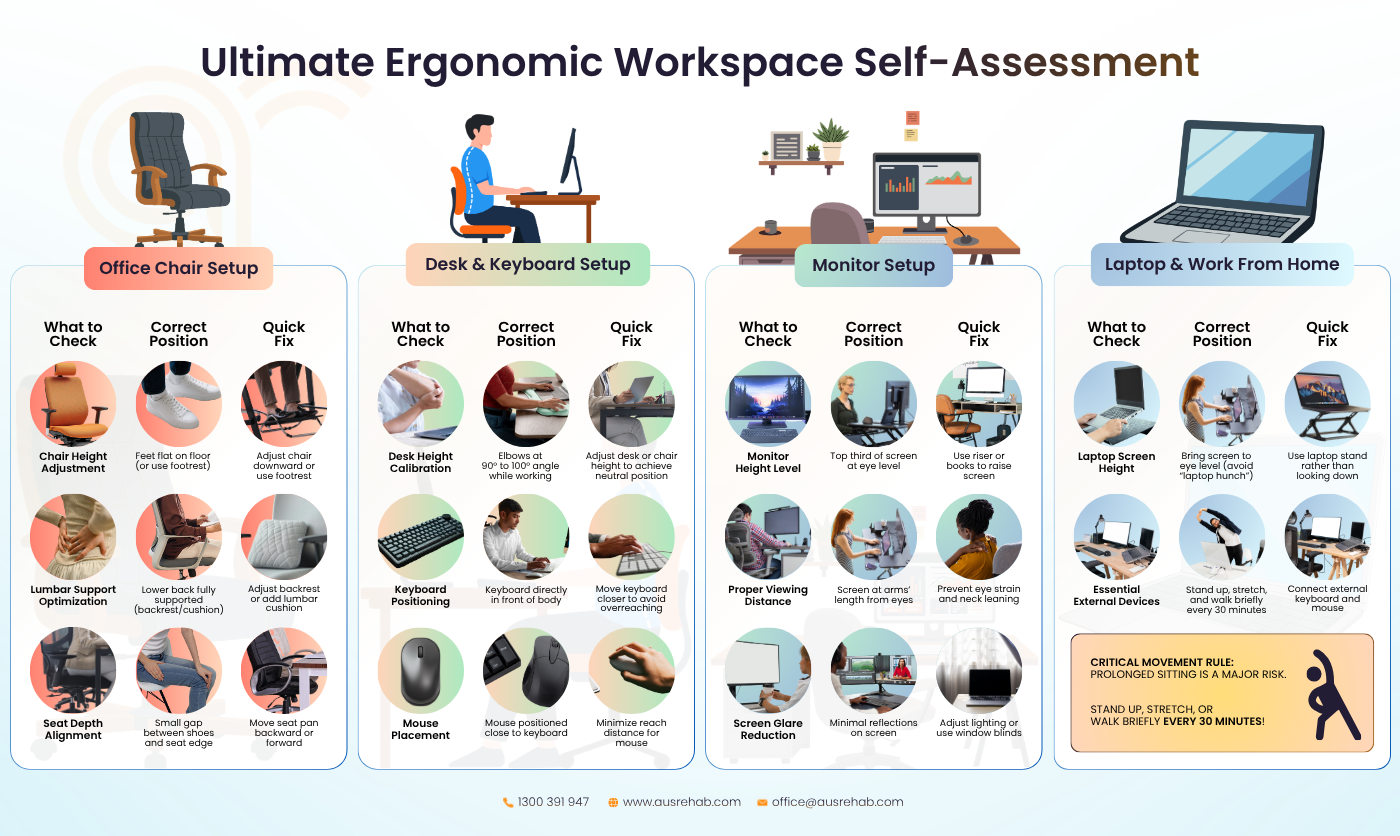
Ergonomic Self-Assessment Checklist
Use this ergonomic self-assessment checklist to review your workstation setup and identify simple adjustments that may improve comfort, posture and productivity.
This checklist is general information only. It does not replace medical advice, workplace safety advice or individual professional guidance.
Office Chair Checklist
Office Chair Ergonomic Checklist
| What to Check | Correct Position | Quick Fix |
|---|---|---|
| Chair height | Feet flat on floor or supported | Adjust chair or use footrest |
| Lumbar support | Lower back supported | Adjust backrest |
| Seat depth | Small gap behind knees | Move seat position where adjustable |
| Shoulder position | Shoulders relaxed | Adjust chair or desk height |
| Arm position | Elbows close to body | Move closer to keyboard |
Desk and Keyboard Setup Checklist
Desk and Keyboard Setup Checklist
| What to Check | Correct Position | Quick Fix |
|---|---|---|
| Desk height | Elbows around 90 to 100 degrees | Adjust chair |
| Keyboard position | Directly in front of body | Move keyboard closer |
| Mouse placement | Close to keyboard | Reduce reaching |
| Wrist position | Neutral and relaxed | Lower keyboard or adjust chair |
| Desk clutter | Clear working space | Move unused items away |
Monitor Setup Checklist
Monitor Setup Checklist
| What to Check | Correct Position | Quick Fix |
|---|---|---|
| Monitor height | Top third near eye level | Raise monitor |
| Viewing distance | About arm's length | Adjust screen |
| Screen glare | Minimal reflections | Adjust lighting |
| Screen position | Directly in front when used most | Reposition monitor |
| Dual screens | Main screen centred | Move the most-used screen forward |
Laptop and Work From Home Checklist
Laptop and Work From Home Checklist
| What to Check | Correct Position | Quick Fix |
|---|---|---|
| Screen height | Eye level where practical | Use a laptop stand |
| External devices | Keyboard and mouse connected | Improve posture with external peripherals |
| Movement breaks | Every 30 minutes where practical | Walk or stretch |
| Chair support | Back supported | Use a better chair where possible |
| Lighting | Clear screen visibility | Reduce glare |
💡 Helpful insight: If a workstation only feels comfortable for the first hour, it may not be supporting the worker well enough for a full workday.
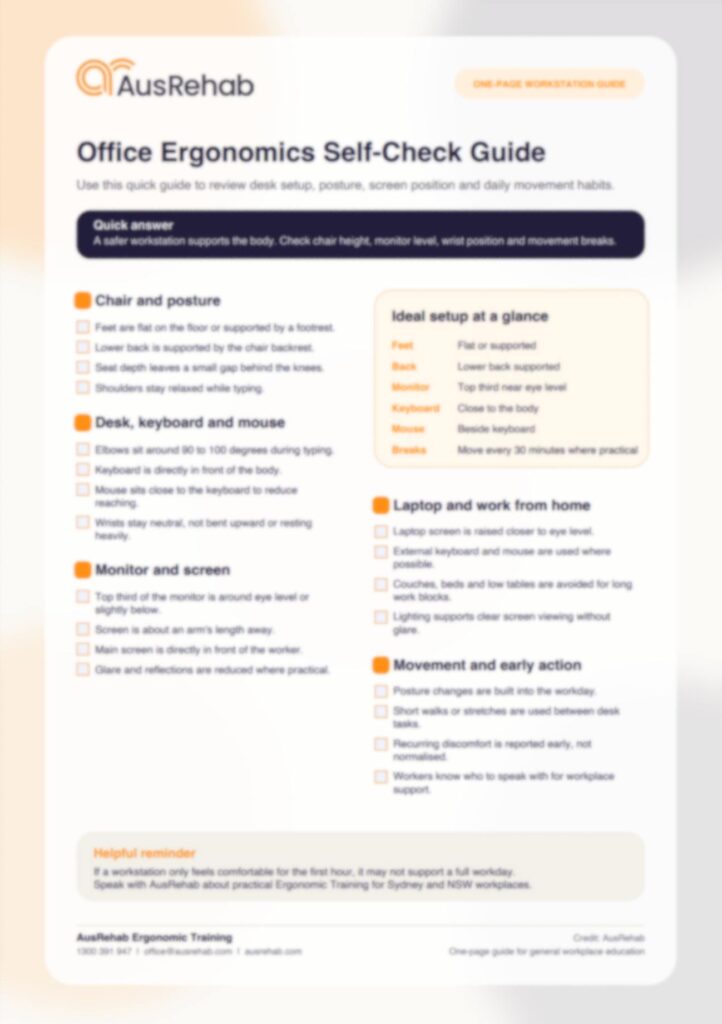
🎁 Get your FREE Office Ergonomics Self-Check Guide!
A complete, one-page checklist — print-ready, reusable, and built for Australian workplaces. Share it with your whole team.
Request it here — we’ll send it to your inbox!
What Happens During an Ergonomics Training Session?
An ergonomics training session helps employees understand how workstation setup, posture and daily work habits affect comfort and injury risk. A session is usually practical, educational and workplace-focused.
It is designed to help employees make improvements they can apply straight away.
- Workstation education
- Posture awareness
- Chair and desk setup guidance
- Monitor height and viewing distance
- Keyboard and mouse placement
- Laptop setup
- Movement strategies
- Stretching recommendations where appropriate
- Common ergonomic mistakes
- Workplace injury prevention habits
- Practical daily task demands
The best ergonomics training is easy to understand. It should not feel overly technical or medical. Employees should leave knowing how to make simple workstation changes and why those changes matter.
For employers, training can create consistency across the workplace. Instead of each worker guessing how to set up their workstation, the team receives shared guidance.
When Should Your Workplace Consider Ergonomics Training?
Your workplace may benefit from workplace ergonomics training if employees spend long periods at desks, use computers daily or work across both office and home environments.
- Onboarding new employees
- Office relocations
- Workstation changes
- Hybrid work arrangements
- Recurring discomfort complaints
- Workplace wellbeing programs
- Injury prevention initiatives
- Safety refreshers
- Equipment updates
- Return-to-work planning after injury
For workplaces with screen-based roles, ergonomics training should not be treated as a one-time task. It works best when it becomes part of a broader culture of comfort, safety and early intervention.
How Often Should Workplaces Provide Ergonomics Training?
There is no single schedule that suits every workplace. Training frequency may depend on staff turnover, workstation changes, the type of work performed, hybrid work arrangements, reported discomfort and broader WHS priorities.
Many workplaces may consider training during induction, after office layout changes, when new equipment is introduced, when teams shift to hybrid work, as part of annual wellbeing or WHS programs, or when workers report recurring desk discomfort.
The aim is to keep knowledge practical and current, not to treat ergonomics as a one-off reminder.
How Ergonomics Training Supports Return to Work and Injury Management
Ergonomics training can also support safe and sustainable recovery when an injured worker is returning to office-based duties.
For example, a worker recovering from a neck, shoulder, back or upper limb injury may find desk work challenging if their workstation is poorly arranged. Ergonomics training can help the workplace understand safer desk habits, task pacing and workstation setup principles.
It does not replace medical treatment or formal claims decisions. It can, however, support the broader recovery environment.
In some situations, other services may also be relevant, such as workplace rehabilitation, Medical Case Conference, Vocational Assessment, CTP case management or workers compensation doctor support, depending on the worker’s situation.
For employers, doctors, insurers and case managers, the key question is not only whether a worker can sit at a desk. It is whether the setup, duties, pacing and work demands support safe and realistic work participation.
Is Ergonomics Training the Same as an Ergonomic Assessment?
No. Ergonomics training and an ergonomic assessment are not the same thing.
Ergonomics training is educational. It helps employees understand safe workstation setup, posture, equipment positioning, movement habits and common ergonomic risks. An assessment is usually more individualised and focused on a specific person, workstation or issue.
For AusRehab, the promoted ergonomics service is Ergonomic Training. This means the focus is on helping workplaces and groups understand safer workstation habits, posture, desk setup and day-to-day work demands.
If a worker has ongoing pain, worsening symptoms or injury-related restrictions, they should also seek appropriate medical or workplace support based on their situation.
Key Takeaways
- Ergonomics training helps workers understand how desk setup, posture and movement affect workplace comfort.
- Office ergonomics is about the fit between the worker, task, equipment and environment.
- Poor workstation habits may contribute to discomfort and fatigue.
- Chair, desk, monitor, keyboard and mouse setup all matter.
- Movement breaks are just as important as equipment setup.
- Laptop ergonomics is important for hybrid and remote workers.
- Sit stand desks should support posture variation, not fixed standing.
- Workplace ergonomics training can help employers build consistent, practical habits across teams.
- AusRehab provides Ergonomic Training for workplaces across Sydney and NSW.
Creating Healthier Workplaces Through Ergonomics Training
Ergonomics training helps employees understand how to set up their workstations correctly, improve posture, reduce physical strain and build healthier workplace habits. Small adjustments to daily work practices can make a meaningful difference to workplace comfort, productivity and long-term wellbeing.
For employees, this means knowing how to position the chair, desk, monitor, keyboard and mouse in a way that supports the body. It also means knowing when to move, when to change posture and when to speak up about discomfort.
For employers, it means creating a workplace where comfort and safety are taken seriously before pain becomes normal.
AusRehab supports employers and workers through workplace ergonomics training, injury prevention strategies, workplace rehabilitation services and return-to-work programs designed to create safer and more productive work environments.
Speak with the AusRehab team about workplace ergonomics training today.
Explore AusRehab’s Ergonomics Training or contact AusRehab to discuss the next step.
Frequently Asked Questions (FAQs)
What is ergonomics training?
Ergonomics training teaches employees how to set up their workstation, improve posture, reduce physical strain and build safer work habits. It usually covers chair setup, desk layout, monitor position, keyboard and mouse placement, laptop setup, movement breaks and common ergonomic mistakes.
Why is ergonomics training important for office workers?
Ergonomics training is important because office workers often sit for long periods, use screens heavily and repeat the same keyboard and mouse tasks each day. Training helps workers understand how to reduce common risk factors linked to poor posture, awkward reaching, low screens and limited movement.
What happens during an ergonomics training session?
An ergonomics training session usually includes practical education about posture, workstation setup, equipment positioning, movement strategies and injury prevention habits. Employees learn how to adjust their desk, chair, monitor, keyboard and mouse to better support their workday.
Can ergonomics training help prevent workplace injuries?
Workplace ergonomics training can help reduce risk factors linked to poor workstation setup, prolonged sitting and repetitive desk work. It does not guarantee that injuries will never happen, but it can support safer habits, earlier awareness and better workplace comfort.
Is ergonomics training better than an ergonomic assessment?
They serve different purposes. Ergonomics training educates groups of workers on safer workstation habits, while an ergonomic assessment usually reviews one person’s workstation. AusRehab’s current promoted service is Ergonomic Training.
What are the signs a worker may benefit from ergonomics training?
Signs may include neck stiffness, sore shoulders, wrist discomfort, headaches, eye strain, lower back pain, fatigue, poor posture, raised shoulders while typing or discomfort during laptop work.
How can I improve my workstation setup?
Start by adjusting chair height, supporting the lower back, keeping feet flat or supported, raising the monitor to a comfortable viewing height, placing the keyboard and mouse close, reducing glare and taking regular movement breaks.
How often should workplaces provide ergonomics training?
Workplaces may consider ergonomics training during onboarding, after workstation changes, when hybrid work is introduced, when workers report discomfort or as part of regular wellbeing and injury prevention programs. The right timing depends on the workplace, staff needs, equipment changes and risk profile.
Is ergonomics training useful for remote workers?
Yes. Work from home ergonomics is important because many home setups are not designed for full-day computer work. Remote workers can benefit from learning how to raise a laptop screen, use external devices, improve chair support, reduce glare and take movement breaks.
Does AusRehab provide ergonomics training for workplaces in Sydney and NSW?
Yes. AusRehab provides Ergonomic Training for workplaces in Sydney and NSW. Training is designed to help workers understand posture, workstation setup, desk layout, monitor position, keyboard and mouse placement and safer work habits.
How can I arrange workplace ergonomics training with AusRehab?
You can speak with AusRehab about workplace ergonomics training by contacting the team directly. Call 1300 391 947, email office@ausrehab.com or contact AusRehab to discuss workplace support.